Replacing Streaming and Local Deployment Modes for ThinApp Packages
Customers can now present ThinApp packages as dynamically attached volumes on storage instead of moving bits around the data center via the network. This removes the network variable, which is often the limiting factor for scalability and performance for deploying ThinApp packages in streaming mode.
Using CloudVolumes ThinApp Edition in a Virtual Desktop Infrastructure
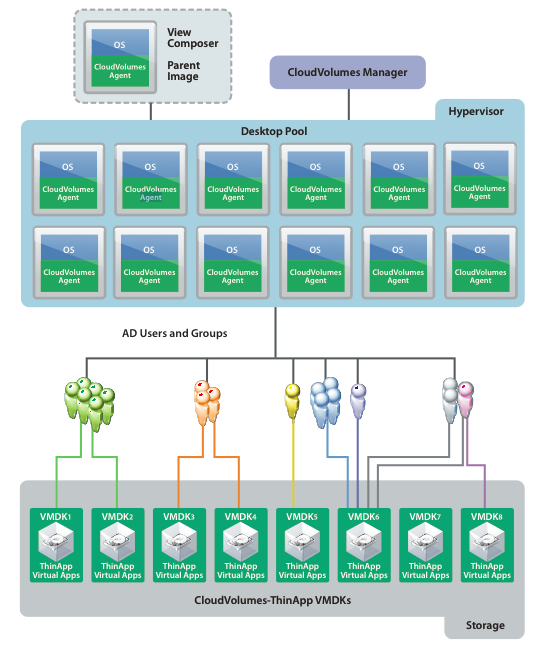
With CloudVolumes ThinApp Edition in a virtual desktop infrastructure, you get the advantages of both streaming and local deployment modes for ThinApp packages. ThinApp virtual applications can be placed on a shared virtual disk (VMDK) on any available storage that vSphere supports, including local storage, SSD, NAS, or SAN. This arrangement permits thousands of virtual desktops to share a common ThinApp package without the need to stream or copy the package locally.
Freemium License
ThinApp Edition will be available to qualified customers in US and EU free of charge. A support fee will be charged to those commercial customers needing support and maintenance or who have 1,000 or more users.
Key features of CloudVolumes ThinApp Edition include:
- Flexibility of deployment: Deploy ThinApp packages from shared VMDKs on any datastore that VMware vSphere supports and scale as needed.
- Centralized management: Manage a single virtual disk containing one or many ThinApp packages and share them across all users. Assign one or more CloudVolumes virtual disks to any active directory user or group. Searchable activity logs for compliance, analytics and audit
- Dynamic delivery: Instantly provision, update or remove ThinApp packages from active VM or at login/logout time
- Access to file automation: Automatically create file associations and shortcuts at log on for all ThinApp packages the user is entitled to
- Increase VM density and simplify hardware support: Increase user density per VMware ESX host by decrease the amount of hardware required to support end users
- Reduce network usage: Significant reduction of network I/O dramatically increasing the performance and responsive of ThinApp packages by 100% compared to hosting ThinApp packages on a CIFS file share.
- Enterprise scale: Solution is designed to support 5,000 ThinApp packages and 10,000 users per Manager with the ability to have as many as 50 Managers